- TypeScript 46.5%
- Clojure 43.9%
- JavaScript 2.7%
- Python 2.6%
- PLpgSQL 1.3%
- Other 2.9%
| Filename | Latest commit message | Latest commit date |
|---|---|---|
 nobody
bd74868a4f
nobody
bd74868a4f
All checks were successful
Clojure CI / clj-check (0) (push) Has been skipped
Clojure CI / detect_changes (push) Successful in 12s
Clojure CI / lint (push) Has been skipped
Clojure CI / clj-build-check (push) Has been skipped
JS CI / detect_changes (push) Successful in 15s
JS CI / Check formatting (push) Successful in 1m34s
JS CI / Build & Test packages (push) Successful in 3m26s
Nushell 0.115.1 deprecates `str downcase` and prints a warning. Both deploy scripts build the release stamp with that command, so the warning appears on every deploy. `str lowercase` is the current name and it returns the same value. |
||
| .claude/commands | ||
| .github | ||
| client | ||
| dev-llm-docs/prompts | ||
| examples | ||
| self-hosting | ||
| server | ||
| .envrc | ||
| .git-blame-ignore-revs | ||
| .gitignore | ||
| default.do | ||
| dev-llm-rules.md | ||
| LICENSE.md | ||
| Makefile | ||
| README.md | ||
| todo.plan | ||
| vercel.json | ||



Get Started · Examples · Try the Demo · Docs · Discord
Instant is the best backend for AI-coded apps. You get auth, permissions, storage, presence, and streams — everything you need to ship apps your users will love.
You write relational queries in the shape of the data you want and Instant handles all the data fetching, permission checking, and offline caching. When you change data, optimistic updates and rollbacks are handled for you as well. Plus, every query is multiplayer by default.
We also support ephemeral updates, like cursors, or who's online. Currently we have SDKs for Javascript, React, and React Native.
How does it look? Here's a barebones chat app in about 12 lines:
// ༼ つ ◕_◕ ༽つ Real-time Chat
// ----------------------------------
// * Updates instantly
// * Multiplayer
// * Works offline

import { init, id } from "@instantdb/react";

const db = init({
  appId: process.env.NEXT_PUBLIC_APP_ID,
});

function Chat() {
  // 1. Read
  const { isLoading, error, data } = db.useQuery({
    messages: {},
  });

  // 2. Write
  const addMessage = (message) => {
    db.transact(db.tx.messages[id()].update(message));
  };

  // 3. Render!
  return <UI data={data} onAdd={addMessage} />;
}
Want to see for yourself? try a demo in your browser.
Motivation
Writing modern apps is full of schleps. Most of the time you start with the server: stand up databases, caches, ORMs, and endpoints. Then you write client-side code: stores, selectors, mutators. Finally you paint a screen. If you add multiplayer you need to think about stateful servers, and if you support offline mode, you need to think about IndexedDB and transaction queues.
To make things worse, whenever you add a new feature, you go through the same song and dance over and over again: add models, write endpoints, stores, selectors, and finally the UI.
Could it be better?
In 2021, we realized that most of the schleps we face as UI engineers are actually database problems in disguise. (We got into greater detail in this essay)
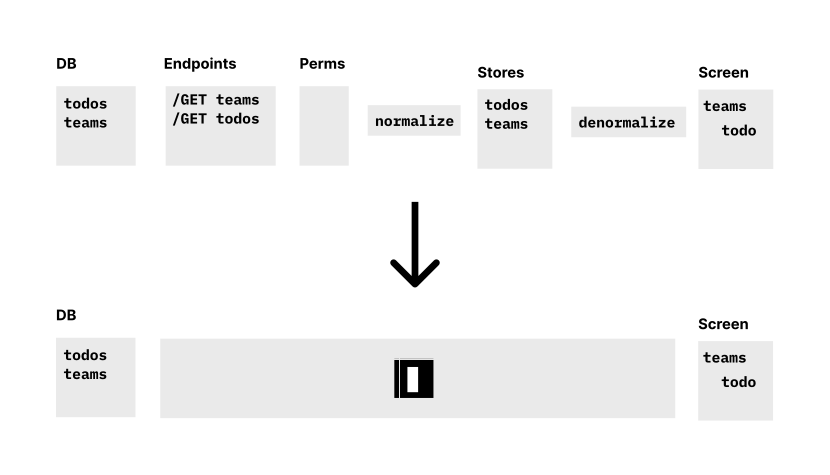
If you had a database on the client, you wouldn't need to think about stores, selectors, endpoints, or local caches: just write queries. If these queries were multiplayer by default, you wouldn't have to worry about stateful servers. And if your database supported rollback, you'd get optimistic updates for free.
So we built Instant. Instant gives you a database you can use in the client, so you can focus on what’s important: building a great UX for your users, and doing it quickly.
Architectural Overview
Here's how Instant works at a high level:
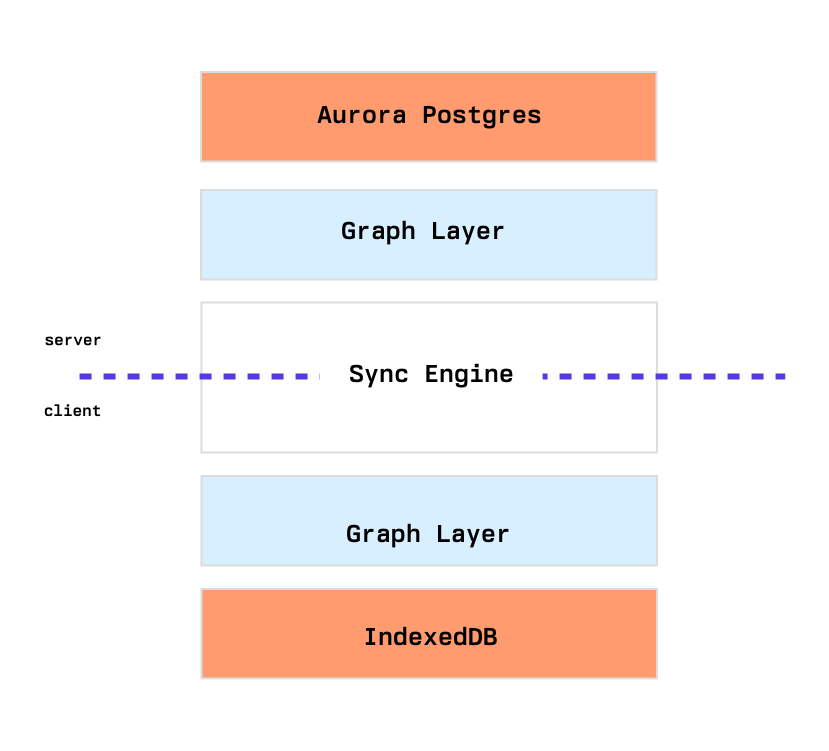
Under the hood, we store all user data as triples in one big Postgres database. A multi-tenant setup lets us offer a free tier that never pauses.
A sync server written in Clojure talks to Postgres. We wrote a query engine that understands datalog and InstaQL, a relational language that looks a lot like GraphQL:
// give me all users, their posts and comments
{
  users: {
    posts: {
      comments: {
      }
    }
  }
}
Taking inspiration from Asana’s WorldStore and Figma’s LiveGraph, we tail postgres’ WAL to detect novelty and invalidate relevant queries.
For the frontend, we wrote a client-side triple store. The SDK handles persisting a cache of recent queries to IndexedDB on web, and AsyncStorage in React Native.
All data goes through a permission system powered by Google's CEL library.
Getting Started
The easiest way to get started with Instant is by signing up on instantdb.com. You can create a functional app in 5 minutes or less.
If you have any questions, you can jump in on our discord.
Contributing
You can start by joining our discord and introducing yourself. Even if you don't contribute code, we always love feedback.
If you want to make changes, start by reading the client and server READMEs. There you'll find instructions to start Instant locally.